Reviews
Creative Draw Racing 3D stands out for its inventive drawing mechanic that lets players design legs for their block. The tracks are well-designed with varied obstacles, and the AI opponent provides a fair challenge. It is easy to pick up but offers depth through creative problem-solving, making it enjoyable for both casual and dedicated players.
Description
Game Introduction
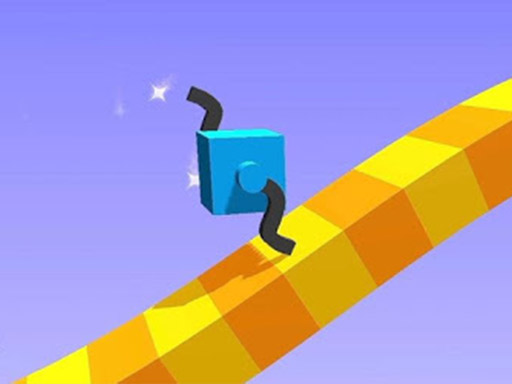
Creative Draw Racing 3D is a unique arcade game that combines drawing with competitive racing. In this 3D environment, players control a block by sketching legs that determine its movement. The main goal is to race against an opponent block across tracks filled with obstacles such as walls, gaps, and slopes. Each level presents a fresh challenge, encouraging players to think creatively and adapt quickly. The game is designed for players of all ages, offering a family-friendly experience that blends simple mechanics with inventive problem-solving. The core appeal lies in the freedom to design legs in any shape, which directly affects speed and stability. This creative element makes each race feel different and keeps the gameplay engaging.
How to Play
To play, players draw legs on their block using a mouse or touchscreen. The shape and size of the legs influence how the block moves—longer legs may increase speed but reduce stability, while shorter legs offer better control. During the race, players must watch for obstacles and can pause to redraw legs as needed. The key is to create legs that are both fast and flexible to navigate the track successfully. Competing to cross the finish line first, players improve their strategy with each new level. The controls are simple, making it easy for anyone to pick up and play.
Game Features
Creative drawing mechanics allow players to design unique legs for each race. Obstacle-filled tracks include walls, gaps, and slopes that test creativity and adaptability. Competitive racing against an opponent block adds excitement and challenge. Simple controls make the game accessible to players of all skill levels. Each level introduces new challenges that require fresh solutions, ensuring the gameplay stays varied. The game is built for quick play sessions or longer gaming sessions, appealing to both casual and dedicated players.
Tips for Success
To succeed, focus on balancing speed and stability when drawing legs. Experiment with different leg shapes to see what works best for each obstacle. Pay attention to the track layout before the race starts to plan your design. Practice regularly to improve drawing speed and accuracy. Learn from each race by observing how your legs perform and adjusting your approach. Stay creative and try new strategies—flexibility is key to overcoming the game's diverse challenges.







03 Comments
Sign in to comment
You must be logged in before posting a review or rating.
No account? Create one
No comments yet. Be the first to comment!