Reviews
Taco Cart Order Fulfillment Challenge delivers a satisfying time management experience wrapped in bright, friendly visuals. The core loop of taking orders, assembling tacos, and serving customers is straightforward but engaging. What sets it apart is the smooth difficulty curve that keeps you on your toes without overwhelming you. The patience meter adds a layer of strategy, forcing you to prioritize orders wisely. It is a perfect choice for casual gamers looking for a quick, rewarding session or for anyone who enjoys fast-paced cooking simulations.
Description
Core Gameplay Loop
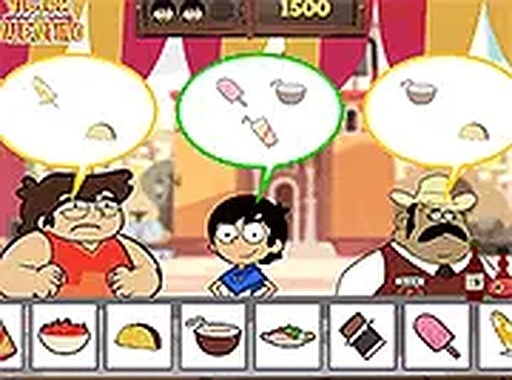
Players manage a small taco stand, taking orders from animated customers who arrive with specific requests. The main activity involves selecting the correct ingredients and assembling each taco before handing it over. Success depends on matching orders precisely and working quickly to keep the line moving. The game rewards accuracy and speed, with a score that reflects how well you meet customer expectations.
Customer Patience System
Each customer has a visible patience bar that slowly decreases while they wait. If the bar empties before their order is delivered, they leave dissatisfied, which hurts your overall score. This mechanic encourages players to prioritize orders from those who have been waiting longest. Balancing multiple orders at once becomes a central challenge as the stand gets busier.
Visual Style and Atmosphere
The game uses bright, cartoon-like graphics that create a welcoming and upbeat environment. Characters are designed with playful expressions, and the taco stand itself is colorful and detailed. The cheerful art style makes the experience suitable for younger players while still appealing to adults who enjoy casual games. The interface is clean and easy to navigate.
Progression and Difficulty Curve
As players successfully complete more orders, the speed of customer arrivals increases. This gradual ramp-up means beginners can learn the basics at a comfortable pace, while experienced players face a satisfying test of their multitasking abilities. The difficulty curve is smooth, ensuring that each session feels challenging without becoming frustrating.
Controls and Accessibility
The game is designed for both mouse and touch screen input, making it playable on desktop computers, tablets, and smartphones. Controls are straightforward: tap or click to select ingredients and serve orders. A full-screen mode is available for those who want an immersive experience. The simple interface means anyone can start playing with minimal instruction.






03 Comments
Sign in to comment
You must be logged in before posting a review or rating.
No account? Create one
No comments yet. Be the first to comment!